How to add a menu to your Google Business Profile
Open your Business Profile and select Edit menu to add dishes and prices, or to upload a menu photo or PDF. To link an online menu, go to Edit profile > Business information > Contact > Menu link, paste the address and save.
Last updated 7 min read

Wood-fired plates and small-batch chai, made fresh all day.
Open now · until 11:30 PM
- Call
- Directions
- Share
Made to share.
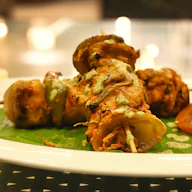
- Smoked paneer tikka$11.00
Charred peppers, mint chutney, pickled onion.
PopularVegetarian
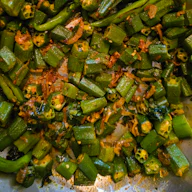
- Crispy okra chaat$9.00
Tamarind, yoghurt, pomegranate, sev.
VegetarianGluten-free
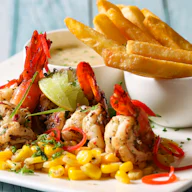
- Chilli garlic prawns$14.50
Curry leaf butter, lime, grilled pav.
Spicy
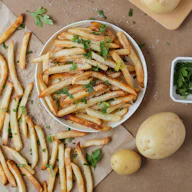
- Masala fries$7.00
Chaat masala, garlic aioli.
Vegan
Cooked over oak in our tandoor.
- Tandoori half chicken$19.00
24-hour marinade, burnt lemon, house slaw.
PopularGluten-free
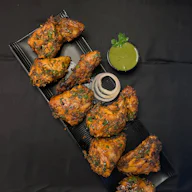
- Black dal & butter naan$15.00
Slow-cooked overnight over embers.
Vegetarian
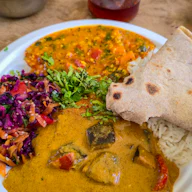
- Lamb seekh kebab$18.00
Hand-minced lamb, green chilli, onion salad.
Gluten-freeSpicy
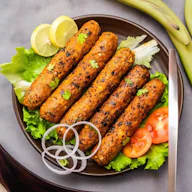
- Jackfruit biryaniSold out
Saffron rice, fried shallots, raita on the side.
NewVegan
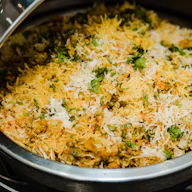
- Cardamom kulfi$8.00
Pistachio, rose, honeycomb.
VegetarianGluten-free
- Gulab jamun$7.00
Warm, with vanilla ice cream.
Vegetarian

- Masala chai$4.00
Assam tea, fresh ginger, cardamom.
Vegetarian

- Mango lassi$6.00
Alphonso mango, yoghurt, a pinch of salt.
VegetarianGluten-free
- Address218 Cedar Street, Austin
- Phone+1 (512) 555-0142
| Monday | 11:00 AM – 10:00 PM |
|---|---|
| Tuesday | 11:00 AM – 10:00 PM |
| Wednesday | 11:00 AM – 10:00 PM |
| Thursday | 11:00 AM – 10:00 PM |
| Friday | 11:00 AM – 11:30 PM |
| Saturday | 10:00 AM – 11:30 PM |
| Sunday | 10:00 AM – 9:00 PM |
Kitchen closes 30 minutes before closing time.
Dietary tags are set by the restaurant. Please tell staff about any allergies.
Made with Tablemenu.Link — create your free menu
What are the ways to add a menu to Google?
There are four: type dishes into the menu editor, upload a photo or PDF of your menu, let Google generate menu items from that photo (an experimental feature), or add a link to your menu online. All four live in your Google Business Profile (formerly Google My Business), and you can combine them.
| Method | Where in your profile | Best for |
|---|---|---|
| Menu items | Edit menu > Add menu item | Dishes and prices shown on the profile itself |
| Photo or PDF | Edit menu > Photos of menu | A quick start from the menu you print |
| Generate a menu (experimental) | Edit menu > Photos of menu > Generate a menu | Turning a one-page menu photo into items |
| Menu link | Edit profile > Business information > Contact > Menu link | A full online menu you update in one place |
Start with the menu link: it is one page you keep current, and the same page can sit behind your QR codes and social profiles. Add menu items too if you want dishes and prices on the profile itself, and update both when prices change.
Sources: Google Business Profile Help, About the menu editor, Edit your Business Profile and Guidelines for representing your business on Google. Google updates its screens from time to time, so a label may read slightly differently.
How do you add menu items, a photo or a PDF?
Go to your Business Profile and select Edit menu. To type dishes, choose Add menu section or Add menu item, enter the details and save. To use your printed menu, select Photos of menu, then upload a photo or a PDF. Customers find your menu under Menu on your profile.
Menu items
- Go to your Business Profile and, above the search results, select Edit menu.
- Select a section or an item, then Add menu section for a heading such as Starters, or Add menu item for a dish.
- Enter the name, price and description, then select Save.
A photo or PDF of your menu
- Select Edit menu, then Photos of menu at the top.
- Choose Select photos or a PDF, or drag and drop your files.
- To remove one later, select Delete on that photo.
Generate a menu from a photo (experimental)
Google can turn a menu photo or PDF into menu items. Upload it under Photos of menu, select Generate a menu, check every dish and price, then select Publish and edit. The feature is experimental and asks you to accept Google's Generative AI Additional Terms of Service. Google's tips: use a sharp, high-contrast photo, and fit the full menu on one page captured in one photo.
What can your Google menu link point to?
A page with your full menu. Google's guidelines say a menu should represent the food and drink that is available, and they rule out sample menus that list only popular items and direct links to third-party ordering or delivery services. Meal-specific menus, such as lunch or dinner, are allowed.
From the menu rules in Google's guidelines for representing your business:
Complete: list the food and drink that is really available, not a few highlights.
Meal-specific is fine: a breakfast, lunch or dinner menu counts as a full menu and can link to your other menu pages.
No ordering or delivery apps: the link can't go straight to a third-party ordering or delivery service.
Agencies ask first: anyone who manages the profile for you needs the owner's consent to submit a menu URL.
A Tablemenu.Link menu is a view-only page: guests read your dishes and prices, with no ordering or payments. One menu holds up to 300 items in 30 categories, enough for a full menu with Lunch and Dinner sections.
Why can't you add a menu, or why isn't it showing?
Usually one of five reasons: the menu editor is only for food and drink businesses, the profile isn't verified yet, the menu comes from the Business Profile API, the change hasn't gone live yet, or Google showed an error. Google says menu changes can take 24–48 hours to appear on Search and Maps.
Not a food and drink business: Google says the menu editor is for food and drink businesses only.
Not verified: some businesses need to verify their profile before they can change anything on it.
Menu from the API: if your menu comes from the Business Profile API, you may not have the menu editor.
Too soon: Google reviews edits before they go live, and menu changes can take 24–48 hours to show.
“Something went wrong”: try again and wait 24 hours. If the error comes back, contact Google Business Profile support.
Choose your business category for what your business is, not to unlock the menu editor. Google's guidelines ask for categories that complete the sentence “This business IS a…”.
How do you keep your menu on Google up to date?
Keep one menu current and point everything at it. If Google finds more than one menu, choose your preferred one, fix or delete items Google copied from your website, and remove old menu photos. When your menu link opens an online menu, editing that menu changes what the link shows.
Choose the preferred menu: select Edit menu, open the Full menu tab, pick your source and select Save.
Check copied items: Google may transcribe menu data from your website. Edit or delete any item that is wrong.
Clear out old photos: delete outdated menu photos you uploaded, and flag an outdated customer photo for removal.
One menu behind every link: use the same online menu for Google, your table QR codes and your social profiles.
Frequently asked questions
Can I add a PDF menu to Google Business Profile?
Yes. Select Edit menu, then Photos of menu, and upload a photo or a PDF of your menu. Customers find it under Menu on your profile.
How long does a menu take to show on Google?
Google says menu changes can take 24–48 hours to display on Google Maps and Search.
Do I need a website to add a menu link?
No. You need a web page that shows your full menu, and a free online menu maker gives you one without a website. It can't be a direct link to a third-party ordering or delivery service.
Can I use my QR code menu's link as my Google menu link?
Yes, if the page shows your full menu. Google's guidelines rule out menus that list only popular items and direct links to third-party ordering or delivery services.
Can I add separate lunch and dinner menus?
Google's guidelines allow meal-specific menus, such as breakfast, lunch or dinner, and a full menu can link to your other menu pages. Each must list what is really available.
Why does Google show an old menu photo?
Customers can add menu photos too. Delete outdated photos you uploaded, flag an outdated customer photo for removal and upload a current one.
Something else? Email hello@tablemenu.link.